Translate text in an image and keep the design
Upload a poster, flyer, menu, ad or product image, pick a language, and get the same picture back with the words translated in the same lettering, colors and places. Names, numbers and prices stay as they are.
- Nano Banana 2
- 3.1 credits
- GPT Image 2
- 1.7 credits
- Seedream 5.0 Flash
- 1 credit
- First try
- Free
Correct any translation before the redraw. Names, numbers and prices are kept as written.
One image · 3.1 credits
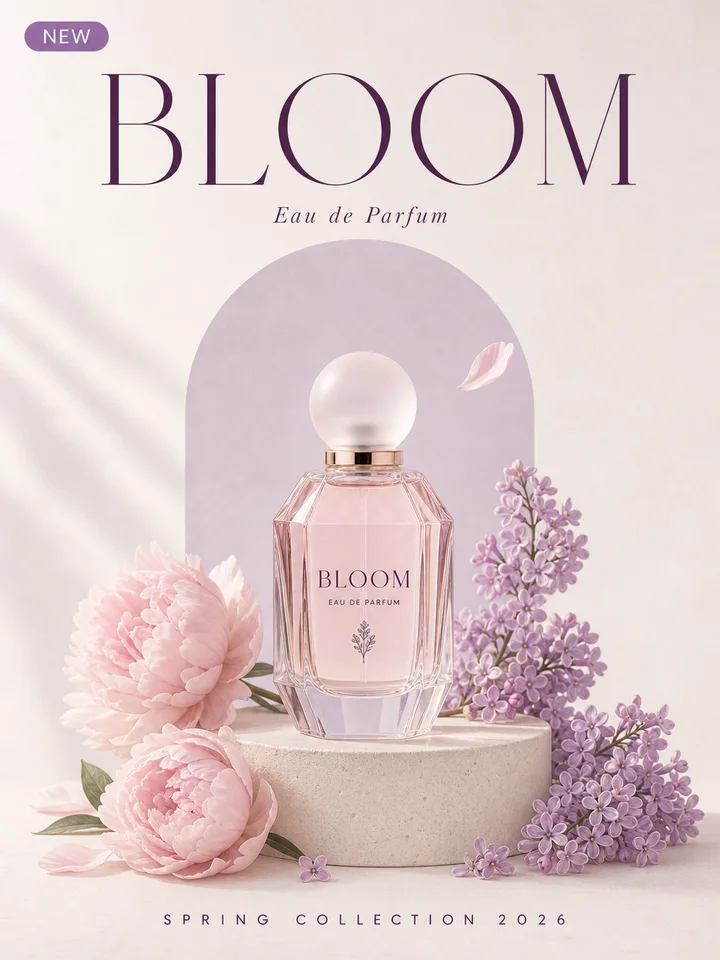
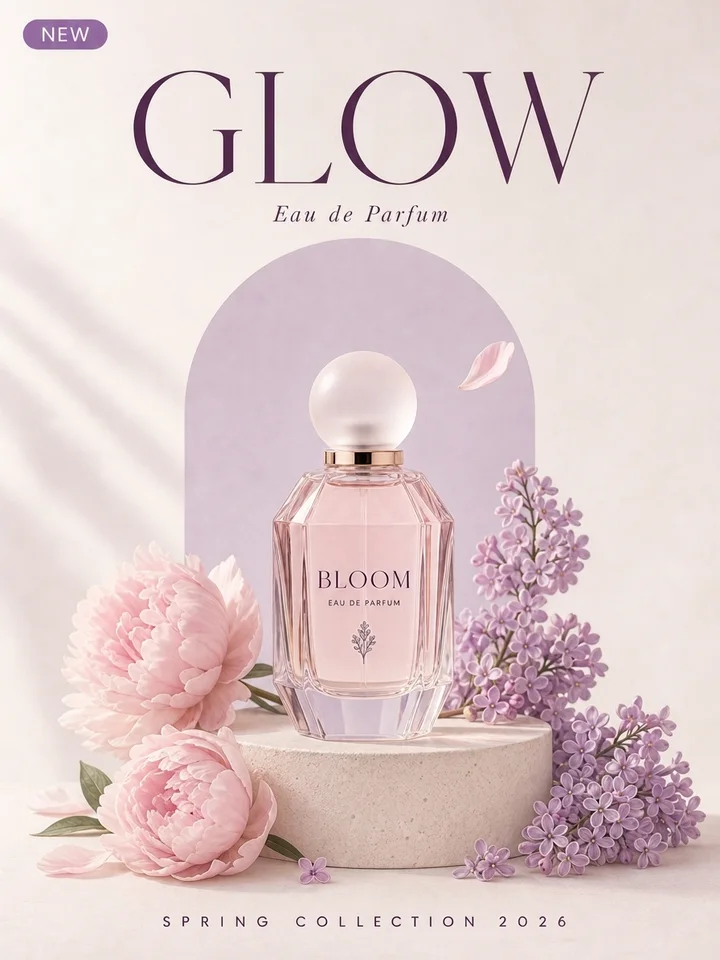
BLOOM GLOW · Nano Banana 2 · ~17 s
Same picture, new language
Upload an image on the left, pick a language and press Read and translate.
Short answer
Yes, you can translate the text in an image and keep the design. Upload the picture and pick a language: LayerPSD reads every line of text, small print included, translates it in context, and lets you correct any line before the image model draws the translation in the same place, in the same lettering style, color and effects. Names of people, bands, brands and places, numbers, prices and currency symbols are kept as written. A redraw takes about 20–30 seconds and uses 3.1 credits on Nano Banana 2 or 1 credit on Seedream 5.0 Flash; reading and translating costs a small fraction of a credit. Your first one is free after Google sign-in.
How to translate the text in a picture
- 1
Upload and pick a language
A JPG, PNG or WebP poster, flyer, menu, ad, packaging shot or screenshot. Choose the language to translate into.
- 2
Read and translate
Every line of text is read and translated in context. Check the translations and change any line you want worded differently.
- 3
Redraw and download
About 20–30 seconds later you get the same picture with the translated text in the same lettering. Compare before and after, then save the PNG.
Before and after
Each pair is one run of this page on Nano Banana 2 at 2K, shown as it came back, nothing retouched.
 Before
 After
AfterEnglish → Spanish
- “NEON NIGHTS” → “NOCHES DE NEÓN”
- “SUMMER FESTIVAL 2026” → “FESTIVAL DE VERANO 2026”
- “FREE” → “ENTRADA”
The neon headline and the spaced subtitle keep their style. The two-line badge reads ENTRADA GRATIS, the natural Spanish order, and the artist names stay in English.
Nano Banana 2 · 28 s · 3.1 credits · 2026-10-11
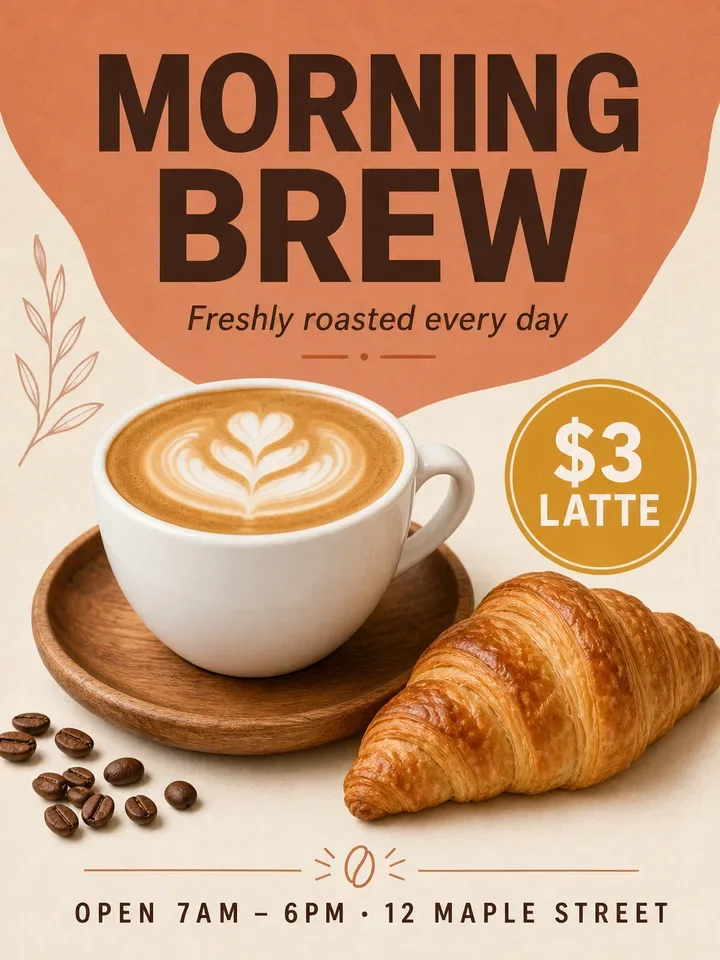 Before
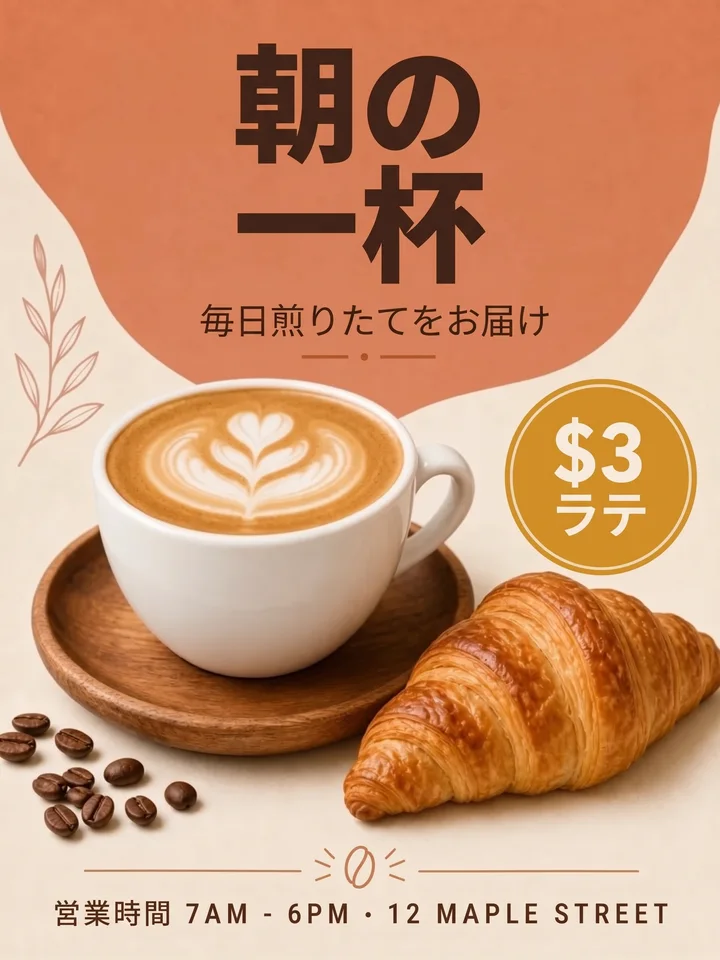 After
AfterEnglish → Japanese
- “MORNING” → “朝の”
- “BREW” → “一杯”
- “Freshly roasted every day” → “毎日煎りたてをお届け”
Headline, tagline and the small opening-hours line all translated into Japanese; the $3 price and the street name are kept.
Nano Banana 2 · 19 s · 3.1 credits · 2026-10-11
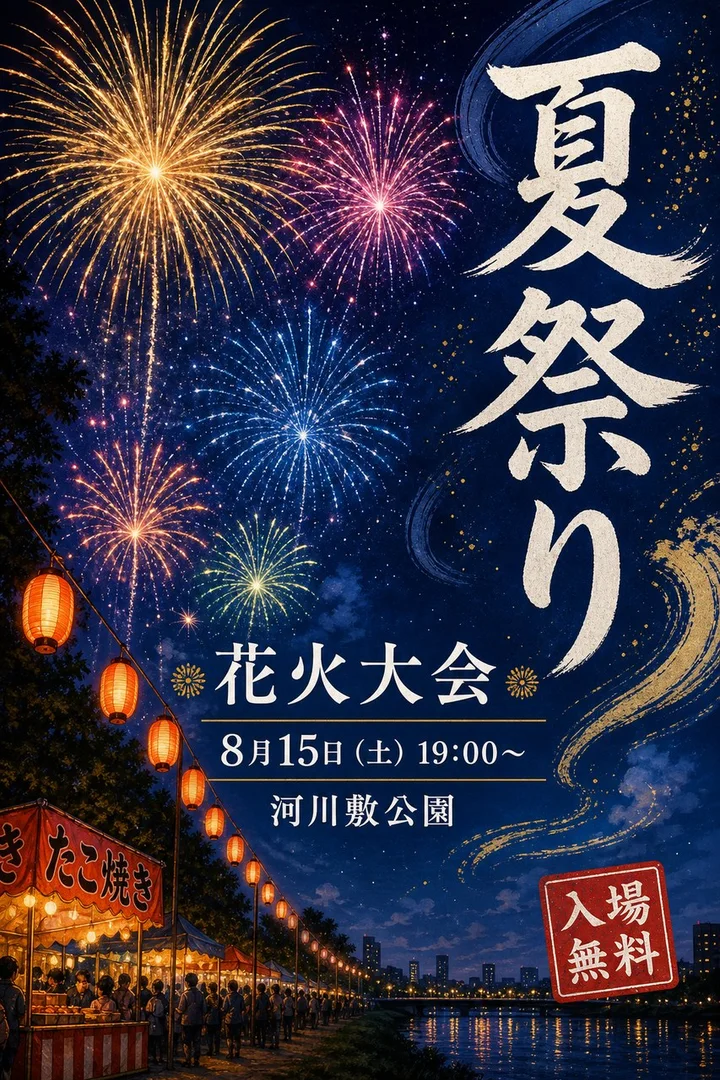 Before
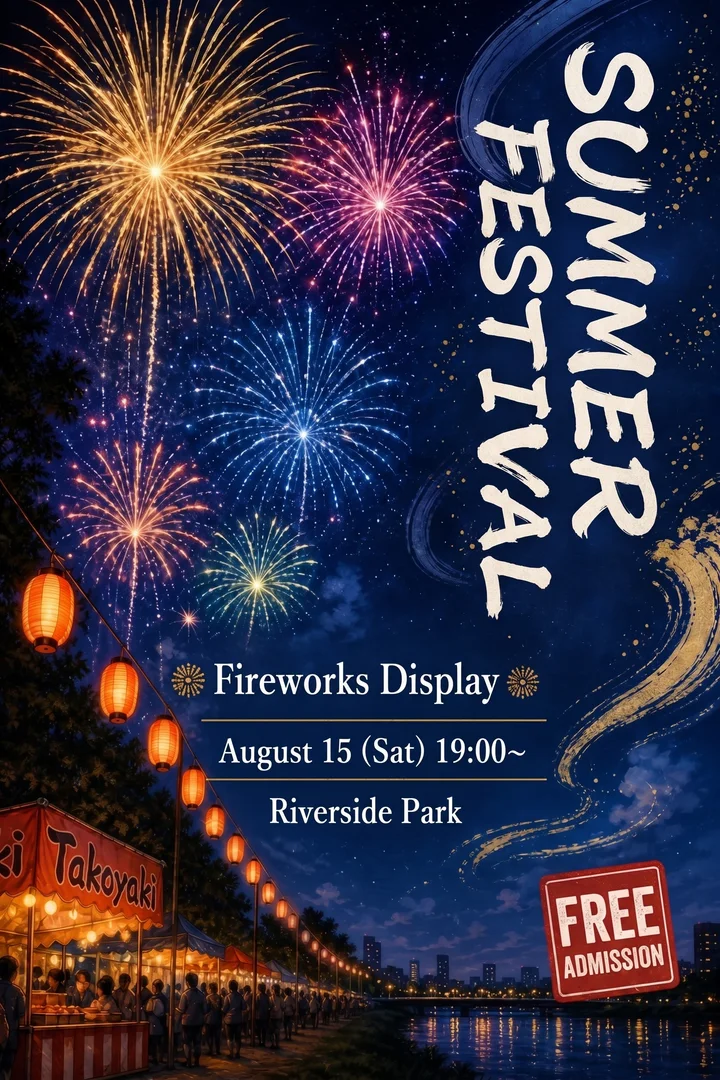 After
AfterJapanese → English
- “夏祭り” → “SUMMER FESTIVAL”
- “花火大会” → “Fireworks Display”
- “8月15日(土) 19:00〜” → “August 15 (Sat) 19:00~”
The vertical brush title became an English title turned on its side, reading top to bottom in the same spot; date, venue, the stall sign and the badge are translated.
Nano Banana 2 · 22 s · 3.1 credits · 2026-10-11
What changes and what stays
Translated
Headlines, subtitles, badges, menu items, captions and small print: every line that is in another language.
Kept as written
Names of people, bands, brands, products, venues and streets; numbers, dates, times, prices and currency symbols.
Kept in style
Each line is redrawn where it was, in the same lettering style, weight and color, with glow, outline and shadow carried over. A much longer translation is set a little smaller.
At a glance
Input
One JPG, PNG or WebP up to 50 MB
posters, flyers, menus, ads, packaging, social graphics, screenshots
Translate into
11 languages
English, Spanish, Portuguese, French, German, Italian, Japanese, Korean, Simplified Chinese, Traditional Chinese, and Arabic
Translate from
Any language with Latin letters, Chinese, Japanese (vertical titles too), Korean or Arabic
Output
The whole picture as a PNG with the translated text, about 2K on Nano Banana 2
Lines
Up to 30 lines per picture, each one editable before the redraw
Price
Reading and translating
a small fraction of a credit. Redraw: 3.1 credits on Nano Banana 2 (recommended), 1.7 credits on GPT Image 2, 1 credit on Seedream 5.0 Flash. Credits from $0.071, no subscription
Free try
One free translation, or one layer split, after Google sign-in with a Gmail account.
No card
Limits
The whole picture is redrawn, so small details can shift and a vertical title may become horizontal; text the reader missed can come out wrong, so check the result before you publish
Other ways to translate the text in an image
Which one fits depends on whether you only need to read the text or need a picture you can publish.
| Way | What you get | Font and layout |
|---|---|---|
| Google Translate or Google Lens | The translation laid over the picture so you can read it | Plain font over the original; good for understanding, not for a design you publish |
| Canva Translate | Translates the text boxes of a design made in Canva | Keeps the layout of Canva text boxes; a flat image needs its text made editable first |
| Photoshop by hand | Paint out each line, find a similar font, type the translation, rebuild the effects | Exact if you own the font; slow on stylised lettering |
| AI image translators | Upload, pick a language, the text is replaced automatically | Varies by tool; compare the result, especially names and prices |
| LayerPSD, this page | Every line read and translated, corrections allowed, then the picture redrawn | Same lettering style, colors and effects; names, numbers and prices kept |
| LayerPSD, editable text PSD | Split the image into layers and export a PSD with live text | Real Photoshop type you can translate and keep editing yourself |
When to use something else
Reading a sign, menu or label while travelling
Use Google Lens or your phone camera; you do not need a new picture.
Documents with long paragraphs, PDFs or slides
Use a document or PDF translator that keeps the file editable.
A file you will keep translating into many languages
Export an editable text PSD and translate the type layers in Photoshop.
Need the text editable in Photoshop instead?
Split the image into layers and export a PSD where text is live type.
Questions
Short answers on splitting, export and billing. Anything else, email us and a person replies.
How do I translate the text in an image and keep the same font?
Upload the image, choose the language and press Read and translate. Every line is read and translated; correct any line you like, then press Translate the picture. The image model draws each translated line where the original was, in the same lettering style, color and effects. It uses 3.1 credits on Nano Banana 2 and your first one is free after Google sign-in.
Can Google Translate translate the text in an image?
Yes, for reading: the Images tab in Google Translate and Google Lens show the translation over the picture in a plain font. When you need a poster, flyer or product image to publish, with the translation in the original lettering and layout, use this page.
Can ChatGPT translate the text in a picture?
It can read and translate the words, and its image model can redraw a picture. Here the reading, the translation and the redraw are set up to keep the layout, names and prices, and you see and can correct every line before anything is drawn.
Will names, prices and numbers be translated too?
No. Names of people, bands, brands, products, venues and streets, and every number, date digit, price and currency symbol are kept as written. In the festival sample the artist names stay in English and in the café sample the $3 price stays.
Which languages can it translate into?
11: English, Spanish, Portuguese, French, German, Italian, Japanese, Korean, Simplified Chinese, Traditional Chinese, and Arabic. The text in the picture can be in any language with Latin letters, Chinese, Japanese, Korean or Arabic.
Does it work with vertical Japanese or Chinese text?
Yes. Characters stacked in a vertical title are read as one line and translated as a whole. The translation is drawn in the same spot: stacked, turned on its side as in the summer festival sample, or horizontal.
Can I change the translation before it is drawn?
Yes. After Read and translate every line is shown with its translation in a box you can edit, so you can fix a word, shorten a line or keep a phrase in the original language.
What if the translation is longer than the original?
It is set a little smaller so it fits the same space, in the same style. For the closest match, shorten long lines in the translation box before you redraw.
Can I translate a menu, flyer, product image or screenshot?
Yes. Anything with readable text works: posters, flyers, menus, ads, packaging, product images, social graphics and app or web screenshots. Very small print is less reliable.
Is it free?
Sign in with Google (a verified Gmail account) and your first translation, or one layer split, is free, with no card. After that a redraw uses 3.1 credits on Nano Banana 2 or 1 credit on Seedream 5.0 Flash, from a one-time credit pack (credits from $0.071).
How accurate is the translation?
It is a machine translation made with the whole picture as context, and you see every line before the redraw. Check names, slogans and anything legal or medical with a native speaker before you print; the picture model can also slip on text it was not given, so compare before and after.
Can I get the translated text as editable layers instead?
Yes. Split the image into layers and export an editable text PSD: every line of regular-size text becomes real Photoshop type that you can translate and restyle there.