Fix text in AI generated images
The picture is right but the words are wrong? Type what the garbled line should say and LayerPSD redraws just those words in the same lettering, colour and effects. No regenerating, no new seed. From 1 credit per image.
- Nano Banana 2
- 3.1 credits
- GPT Image 2
- 1.7 credits
- Seedream 5.0 Flash
- 1 credit
- First try
- Free
Tip: copy the current text exactly, including capitals. Short lines work best.
One image · 1 credit
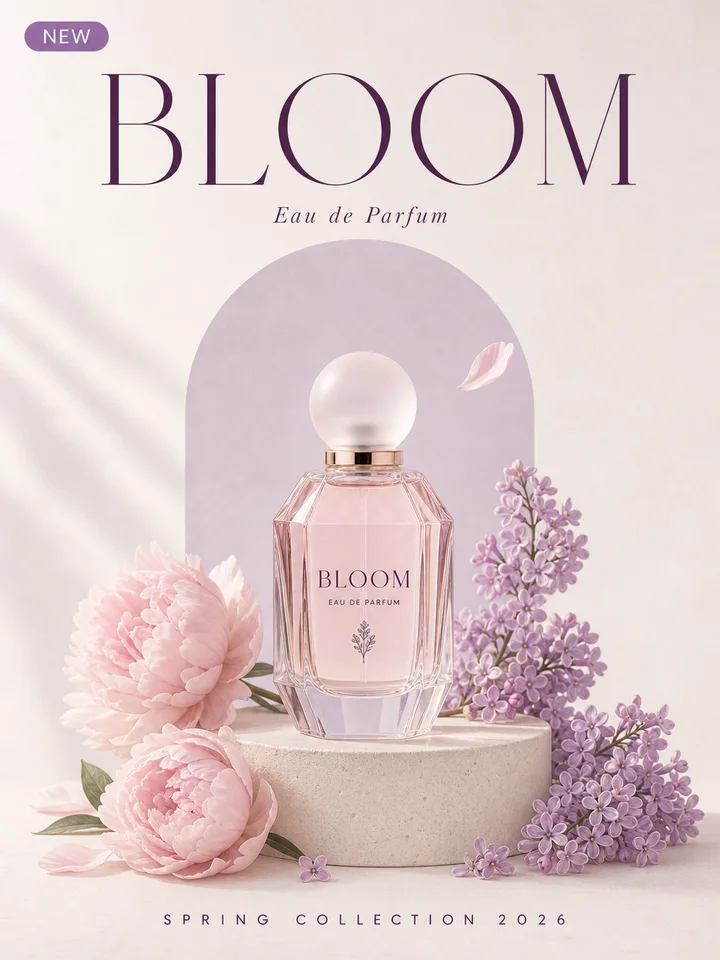
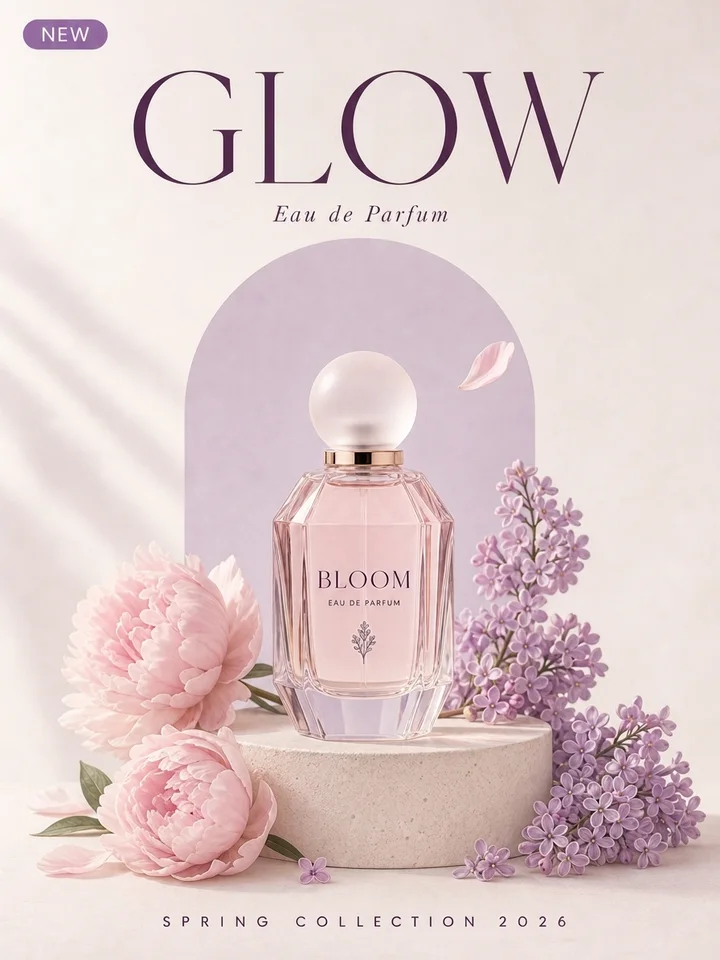
BLOOM GLOW · Nano Banana 2 · ~17 s
Change the words, keep the lettering
Upload an image on the left to change its text.
Short answer
Yes, you can fix the text in an AI-generated image without regenerating it. Upload the picture, press Read text to see what the model wrote (or type it as it reads), type what each line should say, and the image model removes the wrong letters and draws the correct words in the same place, size, font style and colour, with glow, outline and shadow carried over. The rest of the picture is asked to stay exactly as it is. An edit takes about 20 seconds and uses 1 to 3.1 credits; your first one is free after Google sign-in.
How it works
- 1
Upload the AI image
A poster, product shot, logo concept or social graphic from Midjourney, DALL·E, ChatGPT, Gemini, Nano Banana, GPT Image, Flux, Ideogram, Stable Diffusion or any other generator. JPG, PNG or WebP.
- 2
Garbled → correct
Press Read text to pull in each line as the model sees it, then type the right spelling next to it. Several lines can go in one edit.
- 3
Download
About 20 seconds later you get the same picture with the words fixed, as a PNG. Compare before and after, then save.
Before and after
Each pair is one run at 2K, shown as it came back, nothing retouched. The starting posters were generated with Seedream 5.0 Flash; today's generators get short headlines right most of the time (six posters in a row came out spelled correctly), so the misspellings in these two were asked for in the prompt. The correction is the real part.
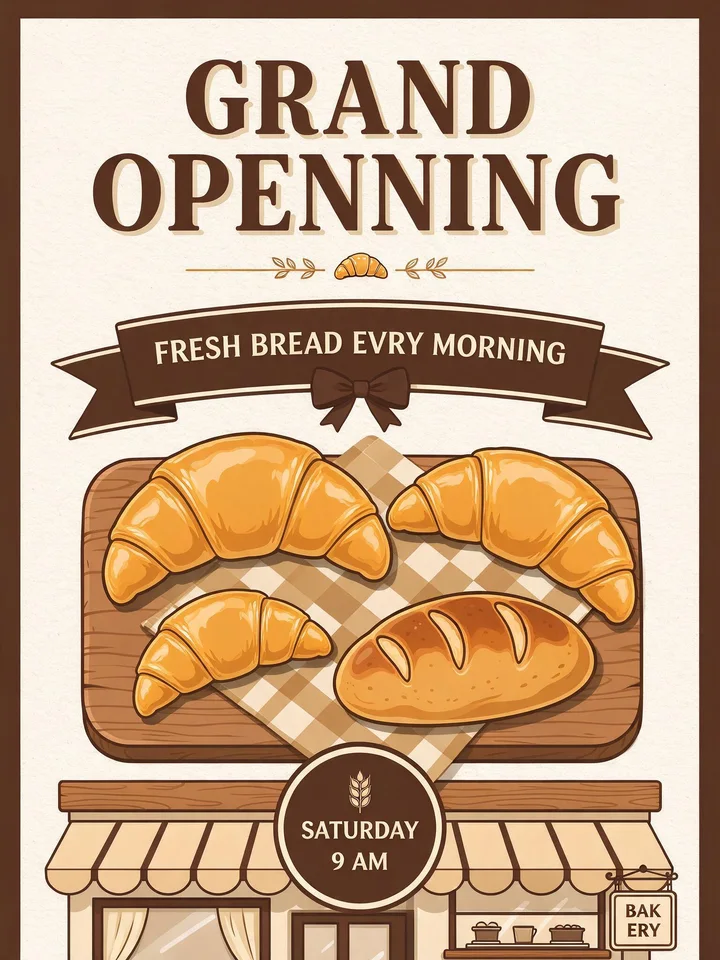 Before
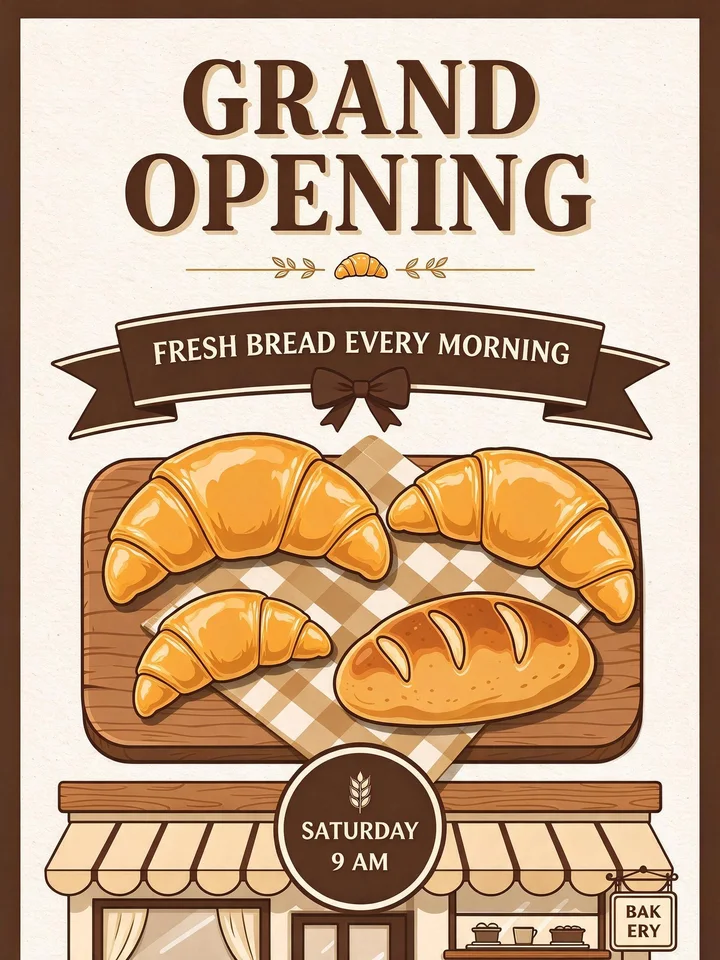 After
After- “GRAND OPENNING” → “GRAND OPENING”
- “FRESH BREAD EVRY MORNING” → “FRESH BREAD EVERY MORNING”
Two misspelled lines corrected in one edit on Seedream 5.0 Flash. The chunky serif headline, its outline and the ribbon stay as they were. Nano Banana 2 fixed “EVRY” but left the doubled N in “OPENNING” in three runs; see “Which model should I pick?” below.
Seedream 5.0 Flash · 20 s · 1 credit · 2026-10-11
 Before
 After
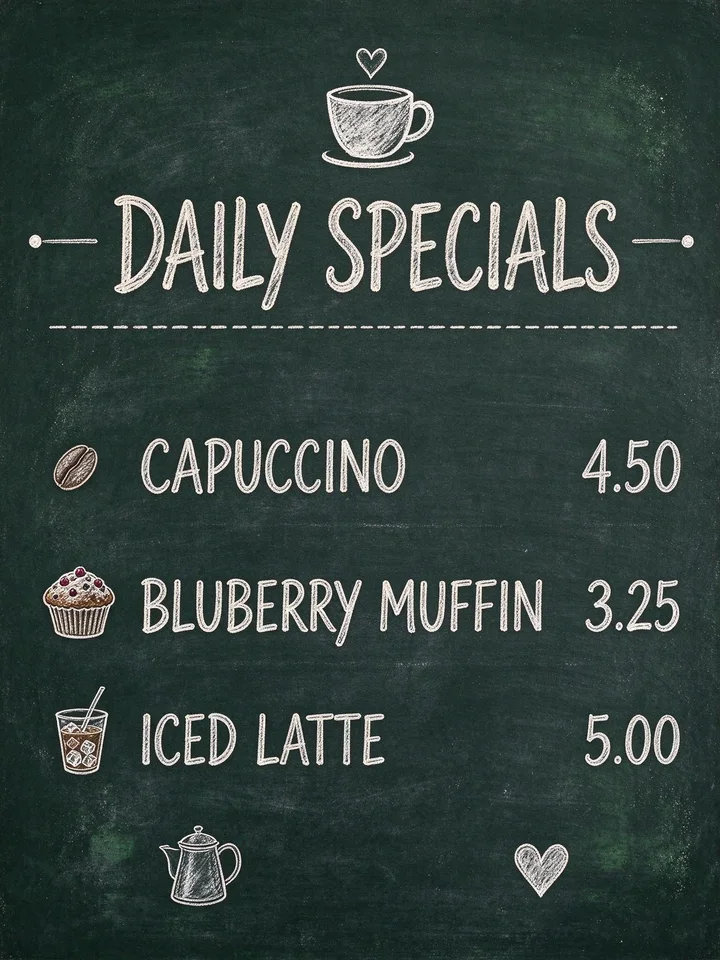
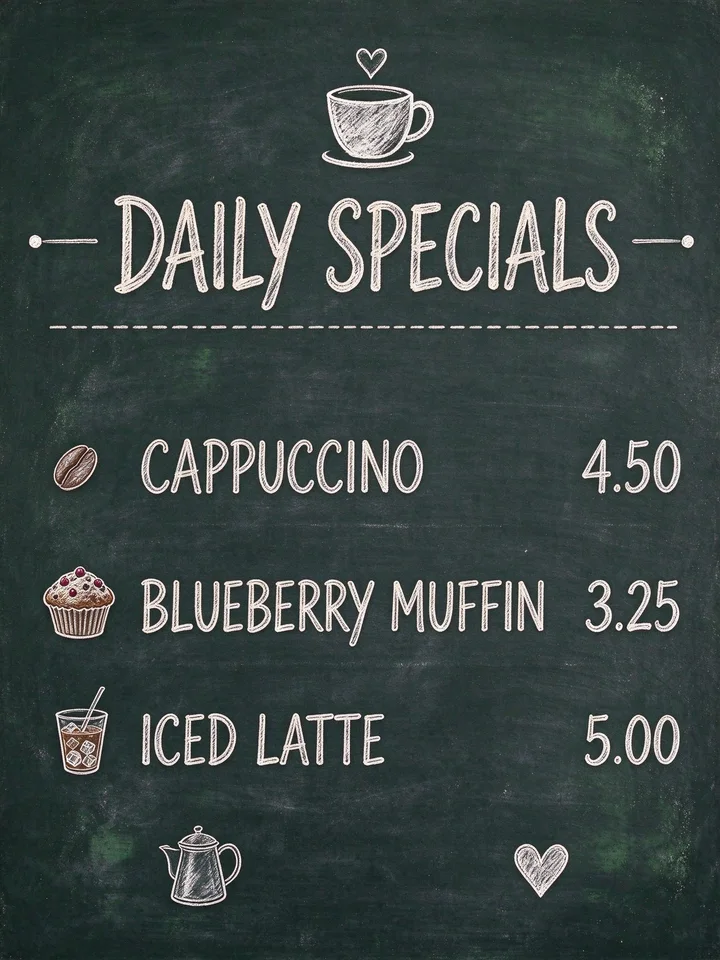
After- “CAPUCCINO” → “CAPPUCCINO”
- “BLUBERRY MUFFIN” → “BLUEBERRY MUFFIN”
Two menu lines corrected in one edit on Seedream 5.0 Flash. The chalk lettering, hearts and prices keep their style; the board is laid out a little tighter, which is the whole-picture redraw described under Limits. Nano Banana 2 fixed “CAPUCCINO” but kept “BLUBERRY” twice.
Seedream 5.0 Flash · 22 s · 1 credit · 2026-10-11
Why AI image generators garble text
Image models paint letters as shapes, not as spelling. Short common words usually come out right; long words, invented names, numbers and small print are where they slip. Regenerating rolls the dice again and changes the whole picture; fixing the words keeps the image you already chose.
Letters are drawn, not typed
The model learned what text looks like, not how to spell. A plausible letter shape in the right place is good enough for it, which is how "GRAND OPENNING" happens.
Regenerating changes everything
A new run with quotes around the text can fix the spelling, but the composition, colours and faces change with it, and the next mistake may be elsewhere.
Correcting only the words keeps the picture
This page sends your image with one instruction: change these words to these words, keep the same lettering, change nothing else. The result is the same image with the right text.
Works with pictures from
- Midjourney
- DALL·E and ChatGPT Images
- GPT Image 2 and 2.5
- Gemini and Nano Banana
- Seedream
- Flux
- Ideogram
- Stable Diffusion
- Canva AI, Adobe Firefly and Leonardo
Any flat JPG, PNG or WebP works; the generator does not matter because the fix is done on the picture, not in the generator.
Other ways to fix text in an AI image
| Way | What you do | What you get |
|---|---|---|
| Regenerate with the text in quotes | Put the exact words in quotes in the prompt and run again | Better odds on the spelling, but a different picture every time |
| Inpaint in the generator | Mask the text and ask for it again | The masked area is repainted; the lettering often changes style, and spelling can slip again |
| Canva Grab Text | Turn the text in the picture into an editable text box | The closest font in Canva's library; effects such as glow or outline need redoing |
| Photoshop by hand | Paint out the letters, identify the font, retype, rebuild the effects | Exact if you own the font; slow for stylised lettering |
| LayerPSD, this page | Type the wrong line and the right line, press Fix | Same picture, corrected words drawn in the same lettering and effects; no font needed |
| LayerPSD, editable text PSD | Split the image into layers and export a PSD | Real Photoshop type you can keep editing, with outline, glow and shadow as layer styles |
At a glance
Input
One AI-generated JPG, PNG or WebP up to 50 MB, from any generator
Output
The same picture as a PNG with the corrected words, about 2K on Nano Banana 2
What stays the same
The composition, colours, faces and everything outside the edited words
the lettering style, size, colour and effects of the words themselves
Changes per edit
Several lines at once, for example a headline and a date
Models and price
Seedream 5.0 Flash 1 credit (fixed every misspelling in our runs), Nano Banana 2 3.1 credits (closest lettering, but can read a near-miss as already correct), GPT Image 2 1.7 credits. No subscription
Time
About 20 s on Nano Banana 2, about 30 s on GPT Image 2
Free try
One free edit, or one layer split, after Google sign-in with a Gmail account.
No card
Languages
Latin scripts, Chinese, Japanese, Korean and Arabic
Limits
Complete gibberish has no "current text" to match, so type it roughly as it reads and say what it should be; tiny print is less reliable; the whole picture is redrawn, so compare before you save
Need the text editable in Photoshop instead?
Split the image into layers and export a PSD where text is live type.
Questions
Short answers on splitting, export and billing. Anything else, email us and a person replies.
How do I fix the text in an AI-generated image?
Upload the image here, press Read text so the model lists each line as it reads, type the correct wording next to any line that is wrong, and press Fix the text. The image model removes the wrong letters and draws the right words in the same place, in the same lettering, colour and effects. You get the same picture back with the text corrected; nothing else is regenerated.
Why do AI-generated images have weird or misspelled text?
Image generators draw letters as shapes rather than spelling words, so a plausible-looking shape in the right spot satisfies them. Short, common words usually come out right; long words, invented names, numbers and small print are where the mistakes land. Newer models make fewer of them, but a wrong date or a doubled letter still slips through.
How can I correct the spelling in an AI image without regenerating it?
Use a text edit instead of a new generation. On this page you type the misspelled line and the correct line, and only those letters are redrawn; the composition, colours and everything else stay as they were. Regenerating, even with the text in quotes, gives you a different picture each time.
What if the text is complete gibberish?
Type it roughly as it reads (Read text will give you the model's best guess) and put the words you want in the second box. The edit replaces whatever is in that spot with the right words in the same style. If the gibberish is long and the replacement is short, the new line is set at the same size and centred where the old one was.
Does it keep the same font and effects?
The new letters are drawn to match the existing lettering by eye: style, weight, colour, size and position, plus glow, outline, gradient and shadow. In our 26-design text-edit test the lettering carried over in 25 of 26 before/after crops on Nano Banana 2. You do not need to know or own the font.
Will the rest of the picture change?
It is asked to change nothing else, and in our tests the rest stays put; the median share of the picture that changed outside the edited lines was under one percent. Because the whole image is regenerated by the model, tiny details can shift slightly, so compare before and after and keep the original.
Does it work with Midjourney, DALL·E, Gemini, GPT Image and Flux pictures?
Yes. The fix is done on the exported picture, so the generator does not matter. Upload the JPG, PNG or WebP you downloaded from Midjourney, ChatGPT, Gemini, Nano Banana, GPT Image, Seedream, Flux, Ideogram, Stable Diffusion, Canva, Firefly or Leonardo.
Can I fix AI image text on my phone or iPhone?
Yes. The page works in the phone browser: upload from your camera roll, type the correction and download the PNG. No app is needed.
Which model should I pick for spelling fixes?
Start with Seedream 5.0 Flash (1 credit). On the two posters above it corrected every misspelled line in one pass. Nano Banana 2 draws the closest lettering on ordinary edits, but it reads a near-miss such as “OPENNING” or “BLUBERRY” as if it were already spelled right and leaves it alone: three runs on the bakery poster and two on the chalkboard each fixed one line and skipped the other. If Flash changes the lettering more than you like, try Nano Banana 2 with the wrong word on its own, or GPT Image 2.
Is it free?
Sign in with Google (a verified Gmail account) and your first text edit, or one layer split, is free, with no card. After that each edit uses credits: 1 to 3.1 per image depending on the model, from a one-time pack starting at $9.90 for 100 credits.
Can I get the corrected text as an editable layer in Photoshop instead?
Yes. Split the image into layers and export an editable text PSD: every line of regular-size text becomes real Photoshop type, with its outline, glow and shadow as layer styles, so you can retype it in Photoshop as often as you like.